
How to buy a new Ford online at Gilbert & Baugh Ford in Albertville, Alabama. Fords REALLY do cost less. Come see the difference. Visit www.gilbertbaughford.com Search our inventory. Pick your vehicle. Calculate and customize your payment. Value your trade. Apply for financing. Schedule a time for pickup or delivery. Buy your new Ford online today at gilbertbaughford.com #ford #fordmotorcompany #fordmotors #forddealer #forddealers #forddealership #cardealer #cardealers #cardealership #cardealerships #dealer #dealership #auto #automobile #automobiles #truck #suv #car #carbuying #al #alabama #albertville #fordvehicle #fordvehicles #fordtruck #fordtrucks #fordsuv #fordsuvs #fordcar #fordcars #fordmustang #certified #preownedvehicle #preownedvehicles #savings #certifiedvehicle #certifiedvehicles #usedcar #usedcars #buyacar #buyatruck #buyasuv #bestford #besttruck #bestcar #bestsuv #bestford #toprated #carbuying #buyacar #howto
We'll Use Video Chat To Help You Pick Your Vehicle
We at Gilbert & Baugh Ford are committed to the safety of our customers and our community. We will go above and beyond to ensure you have a great and safe experience shopping for vehicles with our dealership. Start your shopping today at gilbertbaughford.com At Gilbert & Baugh Ford in Albertville, Alabama Fords REALLY do cost less. Come see the difference. #ford #fordmotorcompany #fordmotors #forddealer #forddealers #forddealership #cardealer #cardealers #cardealership #cardealerships #dealer #dealership #auto #automobile #automobiles #truck #suv #car #ev #electricvehicle #electricsuv #carbuying #salesevent #al #alabama #albertville #fordvehicle #fordvehicles #fordtruck #fordtrucks #fordsuv #fordsuvs #fordcar #fordcars #fordmustang #fordmache #fordmach #fordelectricvehicle #fordelectricvehicles #fordev #certified #preownedvehicle #preownedvehicles #savings #deal #certifiedvehicle #certifiedvehicles #usedcar #usedcars #buyacar #buyatruck #buyasuv #bestford #besttruck #bestcar #bestsuv #bestford #toprated
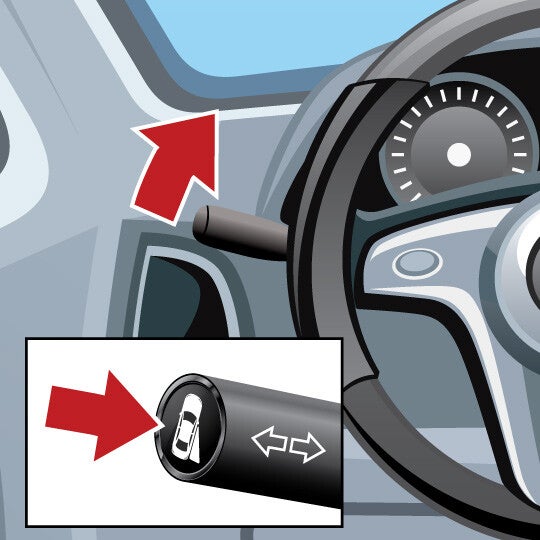
How A Side View Camera Helps You
Sideview Camera Shows you an expanded view of a lane beside you when you use your turn signal, or when you activate the feature manually. This feature shares similar uses to blind spot monitors. Quick Guide 1. Activate Turn this feature on by using the turn signal or pressing a button on the turn signal lever. 2. View Look at the video display to see a view of the road on either side of your car. 3. Double-Check Always look over your shoulders and use side mirrors in addition to using this feature. How it works WHAT IT DOES This feature shows you a video view of what is next to – or coming up alongside – your car. THE TECHNOLOGY BEHIND IT This feature improves passenger-side visibility – and in some cases, offers the driver a 360 degree view of the surrounding area of the car. You can use this feature to protect bumpers, side mirrors, trim and wheel rims from damage at slow speeds. WHAT YOU NEED TO DO Use your turn signal, or activate the feature using a button usually located on your turn signal lever. If you want to use this feature while backing up, it may only turn on if you are going 3 to 7 miles per hour. TIPS FOR USING You should still check your mirrors and always look over both shoulders before changing lanes, parallel parking, making right turns, etc. Question & Answers Does this work for both sides of my car? Depending on your car model, you may be able to see a view of the left-side and/or the right-side of your car when using your turn signal (or when activating the feature manually). What if I want to see the lane next me but don’t need to change lanes? This feature is designed to activate when you use your turn signal. However, for most cars, you are free to turn on the sideview camera screen using a special button located on your turn signal lever. Check your car owner’s manual for more information on how to turn on this feature manually. Content Source: MyCarDoesWhat.org
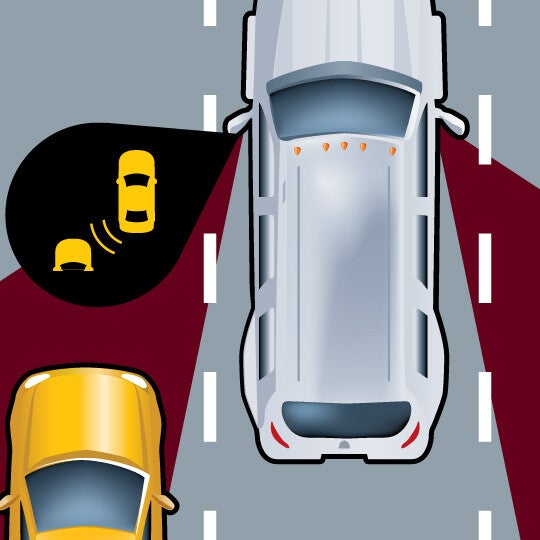
What Your Blind Spot Warning System Does
Blind Spot Warning These features warn you of cars driving in your blind spots. They may provide an additional warning if you use your turn signal when there is a car next to you in another lane. What It Does WHAT IT DOES: Uses a symbol, sound or vibration to let the driver know there are vehicles located in their blind spots. WHAT IT DOES NOT DO: May not detect motorcycles or very fast moving vehicles. Quick Guide 1. Be Prepared Watch for an alert if a vehicle enters your blind spot. 2. Understand Warnings A warning icon lights up when there's a car next to you. You may hear a warning or see a blinking icon if you engage your turn signal. 3. Look Remember to look over your shoulders and use turn signals before changing lanes. How it works WHAT IT DOES This feature will warn you if a car – or sometimes other objects – is in your left or right blind spot. Warnings will appear in your sideview mirrors or in the windshield frame. Some advanced versions of this feature may give you an audible warning (or other type of warning) if you use your turn signal and there is a vehicle in your blind spot. THE TECHNOLOGY BEHIND IT This feature uses sensors that are always monitoring the road to your sides. They are optimized to work at highway speeds. Advanced features will work with your turn signal to provide you additional warnings if you attempt to change into a lane where another car is right next to yours. WHAT YOU NEED TO DO Use the blind spot warning to help you be more aware of other traffic as you travel down highways. You can also use the warnings provided by the blind spot warning when you want to make a lane change – but you should still always look over your shoulders before doing so. TIPS FOR USING Make sure that your blind spot warning’s sensors are not blocked by moisture, snow, dirt or other material. Read your owner’s manual for more information on what the blind spot warning’s various warnings mean. Blind spot warnings are optimized for highway driving and highway speeds; they may not work as well with slow-moving or extremely fast vehicles. Some blind spot warnings are not optimized to detect motorcycles, bicycles or pedestrians. This is why you should always look over your shoulders to check your blind spots before making a lane change. Question & Answers What else is this feature called? Different manufacturers call this system different names. You may see it referred to as: Passive blind spot monitoring Blind spot information system Blind spot assist Side blind-zone alert Will this feature activate for any size of vehicle? Blind spot warnings best detect other vehicles traveling beside your car. However, not all features may be capable of detecting motorcycles, bicycles and other vehicles smaller than a regular-sized car. You should always be aware of your surroundings and the traffic around you as you drive. Always remember to do a head check to confirm there is not a car in your blind spot. After warning me with an icon, will my blind spot warning give me any other warnings? Some blind spot warnings come with alerts that will provide you with additional warnings if you initiate your turn signal and there is already a car in the lane next to you. Check your owner’s manual or with your dealership to find out if your blind spot warning has this capability. Content Source: MyCarDoesWhat.org
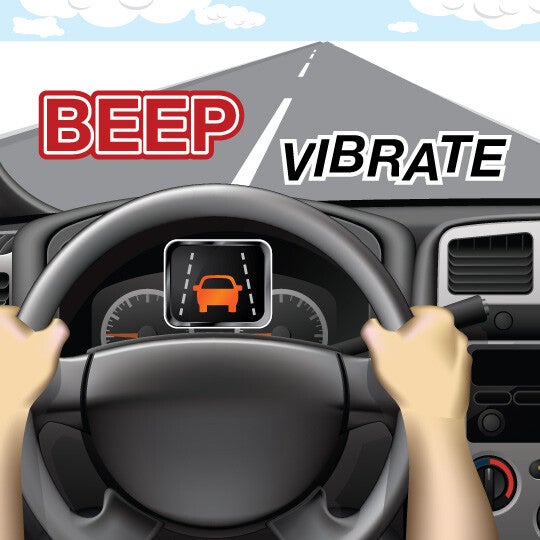
Does Your Car Have Lane Keeping Assist?
Lane Keeping Assist May gently steer you back into your lane if you begin to drift out of it. What It Does WHAT IT DOES: Works to keep you in your lane. Easily cancelled by nudging the wheel. WHAT IT DOES NOT DO: Will not work when lane lines are faint or covered with snow or dirt. Quick Guide 1. Stay Aware You may receive an alert - via a sound, flashing light or vibration - if you drift out of your lane. 2. Respond Return to your lane; if you don't take action, this feature may gently steer you back to the center of the lane. 3. Engage Slightly pulling the wheel will disable the lane keeping assist on most cars. How it works WHAT IT DOES This feature can help return you to your lane if you drift out. This could help prevent a crash. THE TECHNOLOGY BEHIND IT This feature relies on painted lane markings to operate. These include the markings between lanes and along the edges of the road. Some versions of this feature may also help prevent you from driving off the road. WHAT YOU NEED TO DO As you drive, always be aware of your surroundings and the traffic in the nearby lanes. However, if you do drift out of your lane, you’ll see a warning on your dashboard, hear a sound, or feel your seat or steering wheel vibrate. This is your lane departure warning activating. Then, if you don’t respond in time, lane keeping assist will gently steer for you, returning you to the center of the lane. TIPS FOR USING This feature relies on painted lane markings to operate. This feature is not designed to work with markers that are faded, covered, in disrepair, or are overly complicated. If the roadway is covered with snow, leaves, fog or debris, the lane keeping assist may not be able to detect the lane markings on the road. Turning your wheel will override this feature after it activates. Question & Answers What if there are no lane markings on the road? This feature will not work. Lane keeping assist relies on the lane departure warning feature, which reads lane markings, to determine if the car is leaving or has left the lane. If there are no lane markings or they are obscured, neither feature will function. Will this feature work if there’s snow on the ground? Lane departure warning and lane keeping assist must be able to read painted road markings. If these road markings are partially covered by snow, ice, leaves or mud, the lane departure warning and lane keeping assist will not function. Check your owner’s manual or ask your dealer about the limitations of this feature. Content Source: MyCarDoesWhat.org
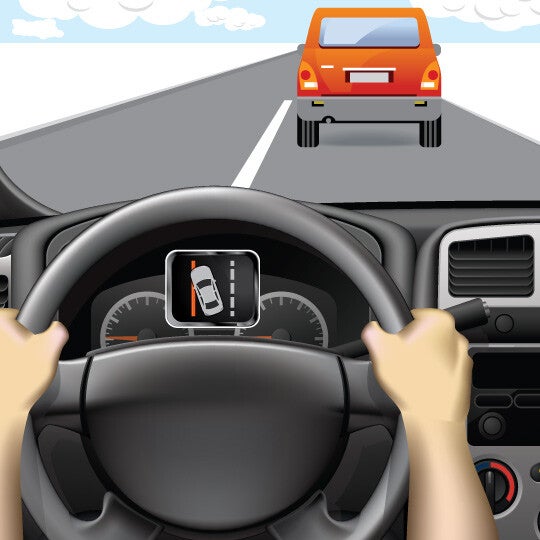
Lane Departure Warning
Lane Departure Warning Lane departure warning systems alert you if you’re drifting out of your lane using visual, vibration or sound warnings. What It Does WHAT IT DOES: On highways when painted road lines are clear and bright on both sides of the lane. WHAT IT DOES NOT DO: Driving when lane lines are covered or faded. Quick Guide 1. Stay Aware of the Warning You may receive a warning if you drift out of your lane. 2. Respond to the Warning Steer back to your lane if you receive an alert. 3. Signal When you change lanes, use your turn signal. How it works WHAT IT DOES This feature can help alert you to drive back to the center of your lane if you mistakenly drift, helping to prevent you from being in a crash. THE TECHNOLOGY BEHIND IT This feature relies on roadway markings to operate. It’s designed to alert you if your car begins to drift out out of a lane with one or more types of warnings. WHAT YOU NEED TO DO As you drive, always be aware of your surroundings and the traffic in the lanes beside you. However, if you do unintentionally begin to drift out of your lane, use this feature to help keep you within your lane. If you do drift out of your lane, you’ll receive warnings on your dashboard, hear a sound, or feel your seat or steering wheel vibrate. TIPS FOR USING This feature relies on lane markings to operate. This feature is not designed to work on unpaved roads or roads without lane markings. If the roadway is covered with snow, leaves, fog or debris, the lane departure warning may not be able to detect the lane markings on the road. Using your turn signal will override the lane departure warning. Question & Answers What if there are no lane markings on the road? Lane departure warning systems rely on road markings to determine if you have drifted out of your lane. If there are no lane markings present, this system may not be able to determine your lane position. Additionally, if the lane markings are fully or partially covered by snow, leaves, fog or debris, the system may not alert you if it can’t read the markings. Check your owner’s manual or with your dealership for more information on how your feature may function during adverse weather conditions. Will lane departure warning features work on highways? Lane departure warning systems work best with highway driving where the roads are mostly straight. Content Source: MyCarDoesWhat.org
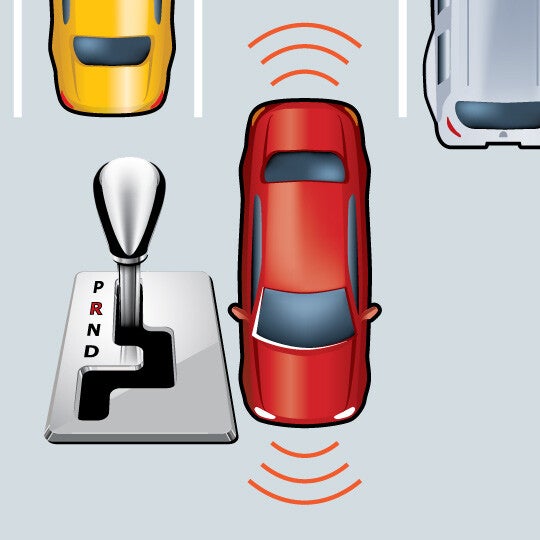
Parking Sensors, What Do They Do?
https://www.youtube.com/watch?time_continue=1&v=RtomEyPQhtM Parking Sensors Alerts you to the position of objects around your car as you park. Quick Guide 1. Shift Shift into reverse to activate the front and rear parking sensors. 2. Listen Listen for the speed of the warning sounds - a constant tone means you are close to an object. 3. Park Visually confirm your car is clear and park. How it works WHAT IT DOES This feature can detect objects in front and back of a car while parking, providing audible alerts if one or more objects are detected. THE TECHNOLOGY BEHIND IT Ultrasonic sensors in the front and back bumpers of the car can detect objects. In most cars, the front sensors can detect objects up to four feet and the back sensors can detect objects up to eight feet. WHAT YOU NEED TO DO When using this feature, listen for any audible warnings that there are objects in front or behind you as you are parking. The intervals between beeps become shorter the closer the car is to an object. Here are what the beeps mean: High-toned, continuous beeps indicate objects are detected near the front bumper. Low-toned beeps indicate objects are detected near the rear bumper. TIPS FOR USING Don’t fully rely on parking sensors to detect all objects in your parking path. They may not detect objects that are flat on the ground, below the bumper, too close to the car, or too far from it. Make sure the sensors are clear of any obstructions on the bumpers, such as snow or dirt. Stay aware of your surroundings while parking, including people or objects that may enter the parking path. Question & Answers Does this feature park my car for me automatically? No, this feature is not designed to park your car for you. You are in full control of your car during parking maneuvers when using this feature. Will this feature help me back out of a parking spot? This feature’s advanced sensors are meant to detect the immediate area surrounding a car to help you park. However, they may not be able to detect objects further away within your backing path, so you shouldn’t rely on this feature to help you back out of driveway or parking spot. This feature also is not capable to detecting cars or other moving objects about to enter your backing path – this is a task that is better suited for a feature such as rear cross traffic alert. Content Source: MyCarDoesWhat.org
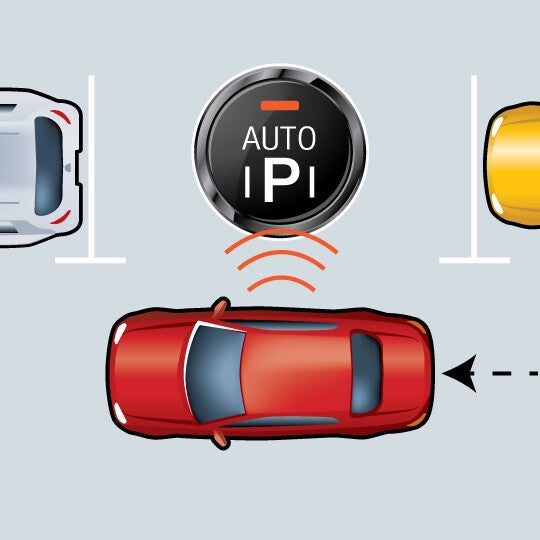
Automatic Parallel Parking
Automatic Parallel Parking Helps guide you into a parallel parking spot after searching and finding a viable option. You still are responsible for braking and monitoring your environment. What It Does WHAT IT DOES: Automatically steers the car into a parking space. WHAT IT DOES NOT DO: Brake or automatically shift gears Quick Guide 1. ACTIVATE Press the park button, find a parking space and pull forward until it notifies you that it has found a spot. 2. SHIFT Shift into reverse, release the brake slightly, and release the steering wheel. 3. FOLLOW INSTRUCTIONS Automatic parallel parking takes over and directs you when to shift into drive. Remember: You are responsible for braking with this feature. How it works WHAT IT DOES This feature can detect objects in front and back of a car while parking, providing audible alerts if one or more objects are detected. THE TECHNOLOGY BEHIND IT Advanced sensors read the gaps between cars in the area where you want to park. The feature won’t activate if there isn’t sufficient room to parallel park, which helps ensure that the car won’t bump into any nearby cars. When activated, this feature can then take over some of the vehicle’s steering and acceleration functions needed to park. WHAT YOU NEED TO DO Activate your car’s automatic parallel parking sensors when you are ready to park. Wait for your car’s automatic parallel parking system to inform you when it has found an appropriate spot for you to park. Follow any prompts provided by your car’s automatic parallel parking feature. These may include pulling in front of the space, shifting into reverse and taking your hands off the steering wheel. You’re responsible for braking. After your car is parked, you may need to do some slight adjustments to ensure your car is in an optimal position. TIPS FOR USING Remember that you are responsible for braking when using automatic parallel parking. You can override the automatic parallel parking maneuver by grabbing the steering wheel. Stay aware of your surroundings while parking, including people or objects that may enter the parking path. Make sure to read your owner’s manual for any directions you need to know when using this feature. If possible, you may want to practice using this feature at your dealership under the guidance of a customer representative. Question & Answers What about perpendicular parking? Some versions of automatic parking assisting features may be able to assist with perpendicular (straight-in) parking spots. Check your owner’s manual or with the technology provider for more information about your unique system’s features. How does this feature avoid hitting the cars in front and behind you when parallel parking? First, this feature will not allow you to activate it if a parking space does not have enough space to allow the feature to park your car. Second, when functioning properly, this feature is designed to not make contact with a car in front or behind your car as it maneuvers into the spot Can I use this feature in a spot without a curb? This depends greatly on the version of the automatic parallel parking feature you are using. Some features are designed so that it needs to be able to detect a curb before it will allow you to activate it. Other features are nearly exclusively reliant on the space between the two cars in which you want to parallel park, and not the presence of a curb. Content Source: MyCarDoesWhat.org
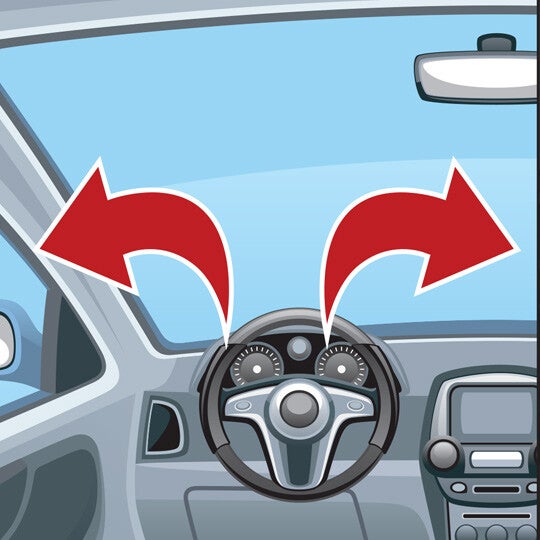
What is the Rear Cross Traffic Alert on My Vehicle?
https://www.youtube.com/watch?time_continue=1&v=Z2DEanjr7ZE Rear Cross Traffic Alert Warns you if one or more vehicles are about to enter your backing path. What It Does WHAT IT DOES: Can detect cars that might be crossing as you back up. WHAT IT DOES NOT DO: May not detect cars behind you when parking spaces are angled; may not detect pedestrians. Quick Guide 1. Look Before backing, look over both shoulders and check the mirror. 2. Shift Put your car into reverse while holding the brake. 3. Be Aware If a vehicle is entering your backing path, a tone and flashing light on your mirror or dashboard may alert you to stop. If so, apply the brake – there may be a car crossing behind you. How it works WHAT IT DOES Rear cross traffic alert is designed to warn you of cars that are entering your backing path. You may not be able to see these cars as quickly as your rear cross traffic alert system can on a road or in a parking lot. THE TECHNOLOGY BEHIND IT Sensors around the rear of the car detect vehicles approaching from the left and right. A warning tone and flashing light on the mirrors or dashboard alert the driver to stop. WHAT YOU NEED TO DO First, make sure you have physically checked behind your car for any objects. Then, shift the car into reverse while you are holding your brake. Check over your shoulders and look at your side and rearview mirrors for any people, animals and objects. Back slowly, and stop if your rear cross traffic alert activates. These systems only work when you are backing straight out of a space or driveway. They don’t work in angled parking spots. TIPS FOR USING Always be sure that you’ve physically checked behind the car before backing out of a driveway or parking spot. There are some objects that back-up warning sensors may not detect, especially if they are located partially under the car. Read your owner’s manual for more information about scenarios in which your rear cross traffic alert may not have been designed to function. For example, if your rear cross traffic alert relies on ultra-sonic sensors, it may not work as well in enclosed spaces. It also does not typically work in angled parking spaces – only where your car is parked straight in. Question & Answers What are some common misconceptions about rear cross traffic alert? Drivers should understand that rear cross traffic alert and other similar backing aids should not be relied on completely. Drivers should always physically check behind the car before backing, as well as turn their heads and check that it’s safe as they begin to back up. Rear cross traffic alert also does not typically work in angled parking spaces. They only work if your car is parked straight in to a spot. Will rear cross traffic alert be required in all new cars at some point? At this time, not directly. By May 2018, all new vehicles weighing less than 10,000 pounds – including buses and trucks – will need to be equipped with a back-up camera. The federal rule behind the mandate does not specify that cars need to have rear cross traffic alert as well. However, manufacturers often pair rear cross traffic alert with back-up cameras, so the rule may end up increasing the popularity of rear cross traffic alert features in the near future. Where is rear cross traffic alert most useful? Rear cross traffic alert is most useful when backing out of a driveway that might be obscured by bushes, fences or another car. It also is useful when backing out of a parking space where the driver cannot see cars that may be coming from the left or right. Content Source: MyCarDoesWhat.org
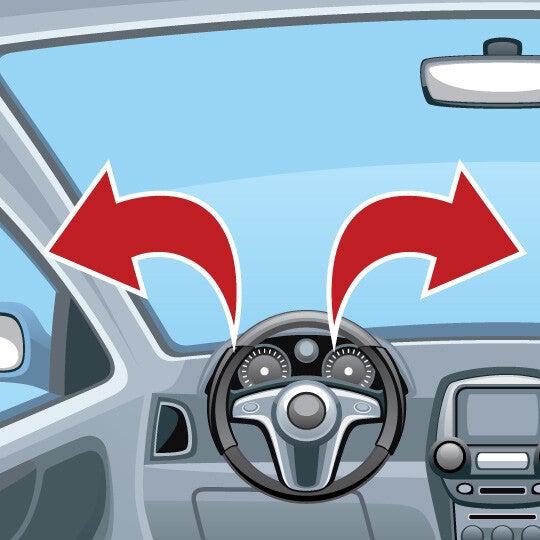
Why Back-up Warning in Your Vehicle Can Save You
Back-up Warning Alerts you of objects behind your car as you back out of spaces like driveways or parking spots. What It Does WHAT IT DOES: Uses rear sensors to scan for objects behind your car and alerts you if one is detected. WHAT IT DOES NOT DO: Will NOT always detect moving objects. Quick Guide 1. Check Before backing out of a parking spot, look over both shoulders and check your mirrors. 2. Be Aware If you feel or hear a warning, there may be an object in your backing path. 3. Take Action Turn and check to be sure it's safe before backing. How it works WHAT IT DOES The back-up warning feature scans behind your car when you shift into reverse. It will let you know – through a sound, vibration, or a mix – if there’s an object or car directly behind you. THE TECHNOLOGY BEHIND IT When the vehicle is in reverse, sensors mounted on the rear bumper detect objects in its path. If an object is in the way, the system may beep or vibrate. WHAT YOU NEED TO DO First, make sure you have physically checked behind your car before backing out. Then, shift the car into reverse while holding your brake. Check over your shoulders and look at your side and rearview mirrors for any people, animals and objects. Then, back slowly, and stop if your back-up warning activates. TIPS FOR USING Always be sure that you’ve physically checked behind the car before backing out of spaces like driveways or parking spots. There are some objects that back-up warning sensors may not detect, especially if they’re located partially under the car. Question & Answers What are some common misconceptions about back-up warning features? Drivers need to understand that back-up warnings should not be relied on completely. Drivers should always turn their heads and check that it’s safe before backing up. Additionally, drivers should always look behind their car before they enter it. According to several vehicle manuals, most back-up warning features will not detect small objects below the bumper or flat objects on the ground directly behind the car. Will back-up warning features be required in all new cars at some point? At this time, not directly. By May 2018, all new vehicles weighing less than 10,000 pounds – including buses and trucks – will need to be equipped with rear visibility systems. This rule most directly applies to back-up cameras, and don’t specify that cars also should have back-up warning systems. However, manufacturers often pair back-up warning features with back-up cameras, so the rule may end up increasing the amount of back-up warning systems in cars in the future. How do back-up warning features improve safety? Unintentional back-overs cause approximately 210 fatalities and 15,000 injuries each year, according to the National Highway Traffic Safety Administration (NHTSA). NHTSA expects rear view visibility systems that meet standards to be 28 to 33 percent more effective at avoiding back-over crashes. Content Source: MyCarDoesWhat.org
Why Back-up Cameras Are Important
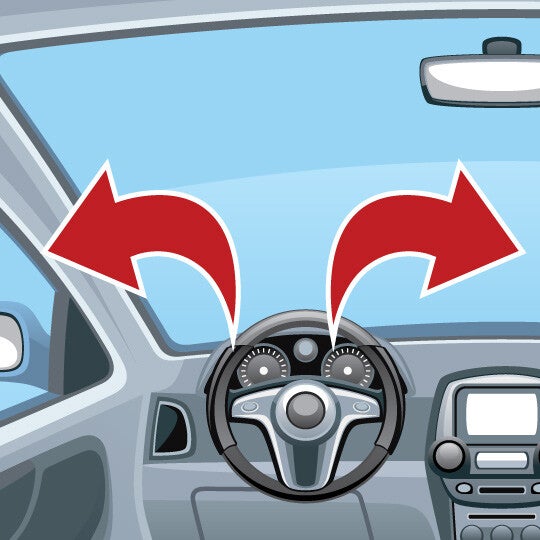
Back-up Camera Back-up cameras help you see objects directly behind you while backing. Remember to always look over your shoulder and in your mirrors as you back up. What It Does WHAT IT DOES: Shows a wide view behind your car while in reverse, even at night. WHAT IT DOES NOT DO: View may not be clear if lens is obscured by snow, dirt or direct sunlight. Quick Guide 1. Look Check behind you by looking over your shoulders and using your mirrors. 2. Shift Shift your car into reverse to activate the back-up camera. 3. Check As you back up, check the monitor for objects while also staying aware your surroundings. How it works WHAT IT DOES After you shift into reverse, the back-up camera activates to show you what is behind your car. Depending on your vehicle, the display screen may be found on the center console, in your rearview mirror or even in your sun visor. THE TECHNOLOGY BEHIND IT A camera, usually mounted on the rear of your vehicle, shows a view of the area behind you. Some systems incorporate lines to show you your backing path in the display. WHAT YOU NEED TO DO First, make sure you walk behind your car to check for objects. Then, turn the back-up camera on by shifting your car into reverse while you’re holding your brake. As you’re backing, continue to check over your shoulders and use your side and rearview mirrors to see anything the back-up camera is not capturing. TIPS FOR USING Always be sure that you’ve physically checked behind the car before backing out of a driveway or parking spot. There are some objects that the back-up camera may not detect, especially if they are close to the ground or under the car. Question & Answers What else is this feature called? Other common names for this feature are “rearview camera,” “rear visibility system” and “wireless back-up camera.” Will back-up cameras be required on all new cars at some point? While many new cars today have them, by 2018, the federal government is requiring that all vehicles are equipped with a rear-view camera. How do back-up cameras promote safety? Unintentional back-overs cause approximately 210 fatalities and 15,000 injuries each year, many involving infants or children, according to the National Highway Traffic Safety Administration. Camera systems have been shown to be more effective than simple sensors systems that beep when an object is detected. Can I get this feature even after I've already bought my car? In many cases, yes. Your dealer may be able to install one for you, or you may be able to purchase a system from an auto parts store that you can install yourself. Content Source: MyCarDoesWhat.org
Did You Know Some Vehicles Have A Drowsiness Alert?
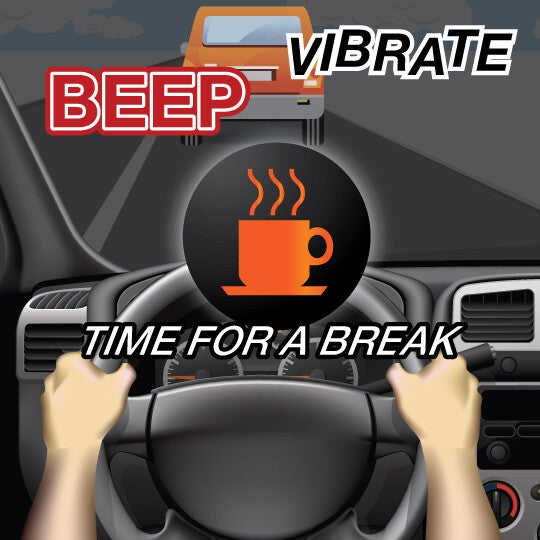
Drowsiness Alert This feature may alert you if you’re drowsy and suggest you take a break when it’s safe to do so. What It Does WHAT IT DOES: A coffee cup or other symbol appears on your dash suggesting you take a break. WHAT IT DOES NOT DO: This system will not necessarily steer you back into your lane. Quick Guide 1. Be alert If driving in and out of your lane, the feature will alert you with a sound, visual warning or vibration. 2. Stay focused Always drive alert and get plenty of rest. 3. Remember Remember: Don’t drive distracted. How it works WHAT IT DOES This feature can detect drowsy driving and alert you to take a break if it suspects you’re drowsy. Common versions of this feature do this by tracking how often you depart from the center of your lane over a set period of time. THE TECHNOLOGY BEHIND IT This feature borrows some of the sensors from lane departure warning systems to track lane markings and your car’s position in your lane. Many versions of drowsiness alert features will track how often you depart from your lane over a short period of time to determine if you may be drowsy. More advanced versions can “learn” what your normal driving patterns are when you aren’t drowsy. If you then begin to drive unusually – such as making many sudden maneuvers or stops – the system may suggest you may be drowsy and should take a driving break. WHAT YOU NEED TO DO Watch, listen and feel for cues from your drowsiness alert system that you may have become drowsy behind-the-wheel. Drowsiness alert systems display a coffee cup and message on your dashboard to take a driving break if it suspects that you’re drowsy. Some systems with audio alerts may verbally tell you that you may be drowsy and should take a break as soon as it’s safe to do so. Your seat may vibrate in some cars with drowsiness alerts. TIPS FOR USING Drowsiness alerts are designed to warn you that you have become drowsy after you have already begun driving; you shouldn’t get behind the wheel in the first place if you know you’re drowsy. Choose a safe, secure location to take a break. Some cars with drowsiness alert may automatically inform you of nearby rest areas using the built-in GPS. On long trips, plan ahead periodic driving breaks – every two hours or so – to reduce the risk of becoming drowsy behind-the-wheel. If driving with other licensed drivers, consider taking turns. Question & Answers Is it true that this feature can read my eye movements? Such a capability does exist, but only for certain versions of drowsiness alert. Those versions use a camera near the steering wheel to detect drowsiness by tracking head bobs and drooping eyelids. This capability is expected to become more popular as this feature evolves. Will this feature know right away if I’ve become sleepy behind the wheel? Most current versions of this feature that rely on tracking lane behavior cannot determine if a driver is drowsy right away. Typically, a driver must drift from the center of the lane a set number of times before the drowsiness alert activates. Check your owner’s manual or with the manufacturer of your particular drowsiness alert feature for more information on when and how it activates. Content Source: MyCarDoesWhat.org

Warranties include 5-year/60,000 mile powertrain and 3-year/36,000 basic. All warranties and roadside assistance are limited. See retailer for warranty details.