Blog / Albertville Ford Dealer

Blog

All Albertville Ford Dealer Gilbert & Baugh Ford Blog Albertville Used Cars Albertville Ford Service Ford How To Videos Ford News News
Forward Collision Warning Step 1

What is Forward Collision Warning?

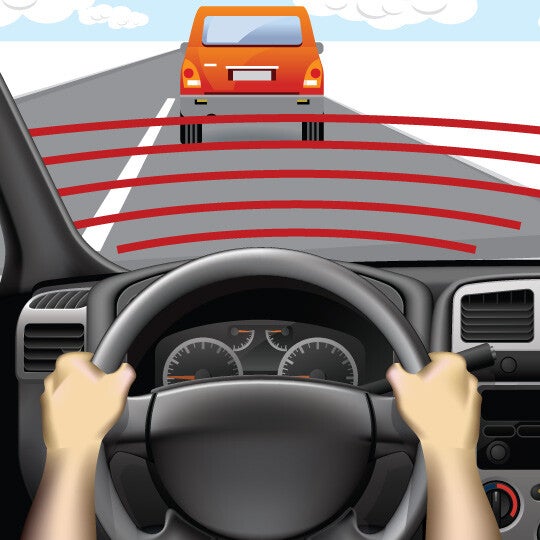
Forward Collision Warning Forward collision warning can alert you of an impending collision with a slower moving or stationary car in front of you. What It Does WHAT IT DOES: Designed to alert you to a hazard ahead so that you can brake or swerve in time. WHAT IT DOES NOT DO: Forward collision warning alone will not automatically brake for you. Quick Guide 1. Scan Scan the road ahead and maintain a safe following distance. 2. Be Alert Warning tones or visual alerts will warn you that a collision is about to occur. 3. Prepare to Brake Brake or steer to safety to avoid a crash. How it works WHAT IT DOES Forward collision warning scans the road ahead while you drive. It’s designed to warn you if you’re about to crash into a slower moving or stopped car. Some features can detect other objects, but check your owner’s manual to make sure you understand its capabilities. THE TECHNOLOGY BEHIND IT Sensors located in the front of your car are able to detect how close you are to cars in front of you. These typically are camera- or radar-based. Warnings can come in the form of sounds, visuals, vibrations or a quick brake pulse; or, a mix of warnings. WHAT YOU NEED TO DO Always be a cautious driver and keep a safe following distance from the traffic ahead of you. However, sudden braking might be needed at any time. Forward collision warning is designed to alert you to a hazard ahead so that you can take action in time. If you are warned by the system, prepare to brake or steer quickly. TIPS FOR USING Your forward collision warning feature’s sensors can be blocked by ice or snow, so be sure to clear any build-up off your feature’s sensors before you begin driving. If you aren’t sure where your forward collision warning’s sensors are located, you can always check your owner’s manual or with your dealership. Some forward collision warning features are vulnerable to glare at sunrise and sunset, so don’t rely on this feature exclusively. Always pay attention to the road ahead. Rear-end crashes are the most common crash type in the United States. Question & Answers What else is this feature called? Different manufacturers call this system different names. You may see it referred to as: Pre-crash system Forward crash warning Collision mitigating system Collision avoidance system Forward collision avoidance system Rear-end crash avoidance system Automotive collision avoidance system Does this feature brake my car for me? Newer forward collision warning features with automatic braking may also brake your car in an emergency. While this capability is becoming more and more common in many new cars today, not all earlier versions of forward collision warning can slow or stop your car automatically. Check your owner’s manual or with your dealership for more information. Will this feature detect any size of vehicle? Forward collision warning best detects vehicles in front of you. However, not all features will be capable of detecting motorcycles, bicycles, pedestrians, some farm machinery and other vehicles smaller than a car. Does forward collision warning work in bad weather? Some versions of this feature use different types of sensors to detect other vehicles in front of you. Some of these sensors may not work well in some conditions, such as driving through fog or driving inside of a tunnel. Rain and snow can also affect such systems. Content Source: MyCarDoesWhat.org
What is Brake Assist?

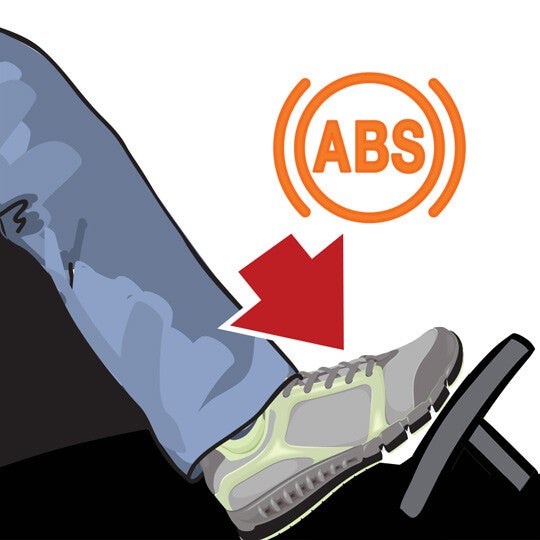
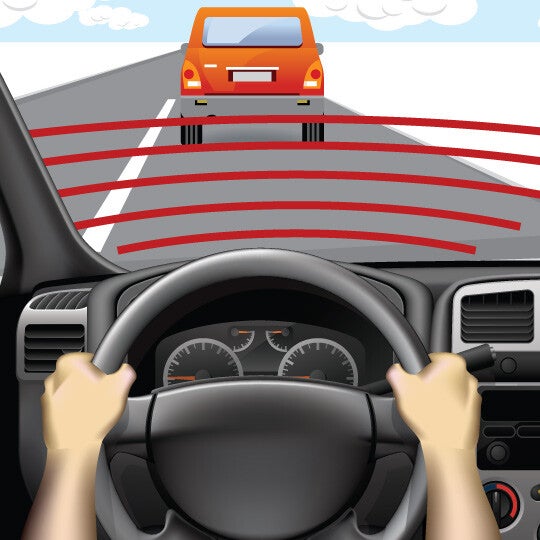
Brake Assist Adds additional braking power to your car during emergency stops. Drivers’ reaction times don’t always match how quickly they need to react to avoid a crash. If electronic braking assistance notices drivers slamming the brake pedal, it applies maximum force to the brakes to help make sure the car stops as quickly as possible. Make sure to keep a safe following distance from vehicles ahead of you as you drive. What It Does WHAT IT DOES: You brake, it brakes harder. WHAT IT DOES NOT DO: Does not automatically stop your car. (See Automatic Emergency Braking) Content source: MyCarDoesWhat.org

What Are Adaptive Headlights?

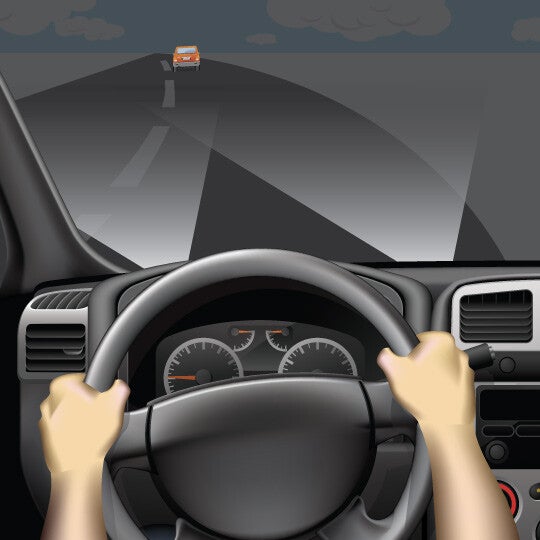
Adaptive Headlights Adapts to changing roadway conditions – such as curves – to better help illuminate the roadway along your path. What It Does WHAT IT DOES: Headlights actually move side to side as the steering wheel turns. WHAT IT DOES NOT DO: Does not automatically switch from low beams to high beams. Quick Guide 1. USE Adaptive headlights adjust to help you see on dark curved roads and over hills. 2. STEER They move when you steer. 3. SCAN Be aware of objects ahead. How it works WHAT IT DOES Adaptive headlights better illuminate the driving environment compared with traditional headlights, allowing you to see more at night or in low-light conditions. THE TECHNOLOGY BEHIND IT Unlike traditional headlights, which are in a fixed position and only capable of illuminating directly in front of you, adaptive headlights are not in a fixed position at all times. These headlights use electronic sensors that can detect your steering angle to swivel based on the direction your car is heading. WHAT YOU NEED TO DO Use these headlights as you normally would and pay attention to any objects or vehicles that are illuminated by them – especially on curves. As always, make sure to scan ahead while driving for potential obstacles or road hazards. TIPS FOR USING IT Reduce your speed and drive cautiously when approaching a curve. If you spot a hazard, react by braking or steering – don’t oversteer or you may lose control. When approaching oncoming cars with their high-beams activated, it’s a good practice to look toward the white lines on the side of the road in front of you to help prevent you from being blinded. Question & Answers Do adaptive headlights shine up and down hills? Adaptive headlights, as currently marketed, are primarily intended to move side-to-side to help illuminate curves and corners. Some versions of this feature – or other types of features altogether – are capable of moving up and down. This capability is helpful for seeing up and down sharp inclines. Can adaptive headlights auto-dim to help prevent blinding oncoming motorists? Auto-dimming headlights are separate features from adaptive headlights; but if you have adaptive headlights, this feature may have been packaged with it. Check your owner’s manual or with your dealership to find out more about what your headlights’ capabilities are. Content Source: MyCarDoesWhat.org

Automatic Braking Step 1

What is Automatic Emergency Braking?

Automatic Emergency Braking This feature can sense slow or stopped traffic ahead and urgently apply the brakes if the driver fails to respond. What It Does WHAT IT DOES: Uses sensors to track cars ahead and automatically slam on the brakes in an impending crash. WHAT IT DOES NOT DO: It can’t always prevent a rear end collision, but may lessen the severity. Quick Guide 1. Scan Scan the road for hazards and maintain a safe following distance. 2. Be Alert If in a collision imminent situation and you have not responded, the car will automatically brake hard. Warning tones and other visual alerts may also activate during or after the emergency event. 3. Take Action Brake or steer to avoid the hazard ahead. If you don’t, the vehicle will slow down rapidly or stop on its own to avoid a crash. How it works WHAT IT DOES This feature may typically be paired with a feature called forward collision warning. That feature scans the road ahead while you drive, warning you if you’re about to crash into a car. If you don’t react in time, automatic emergency braking quickly slows down your car or can even bring your car to a stop. THE TECHNOLOGY BEHIND IT Sensors located in the front of your car are able to detect how close you are to the car ahead. These typically are camera- or radar-based sensors. Warnings can be sounds, visual or vibrations, or a mix of warnings. If your car begins to brake, this will also act as an alert. WHAT YOU NEED TO DO Read your car manual or ask your dealer how your specific system works. These systems are not standard and vary from model to model. Automatic emergency braking is not fool-proof. Always keep a safe following distance from the traffic ahead. Stay focused on the road. TIPS FOR USING Automatic emergency braking relies on sensors that may be blocked by dirt, ice or snow. If so, the system will tell you that it won’t work. So, be sure to clear any build-up off your feature’s sensors or windshield before trips. Not sure where your automatic emergency braking’s sensors are located? You can always check your owner’s manual or with your dealership. Some automatic emergency braking features are vulnerable to glare from sunrise and sunset. You shouldn’t rely on this feature exclusively during those times – or at any other time. Question & Answers What are other names for this feature? You may find this feature marketed under one of the following names, or others: Forward collision mitigation system Pre-crash warning and braking system Intelligent braking At what speeds are this feature effective? Automatic emergency braking is generally designed to activate at highway speeds, as long as the forward collision warning sensors are able to detect the vehicle ahead. Newer systems work at slower speeds in towns. However, not all automatic emergency braking features are able to bring your car to a full stop. At speeds faster than normal highway speeds, automatic emergency braking may still be able to help slow you down enough that you can avoid the hazard. Will this feature activate for any size of vehicle? Automatic emergency braking and forward collision warning features are optimized to detect other vehicles in front of you while you drive. However, not all features will be capable of detecting motorcycles, bicycles and other vehicles smaller than a car. This is why you should always be aware of your surroundings and the traffic ahead, and never fully rely on a feature such as automatic emergency braking to help prevent you from being in a crash. Content source: MyCarDoesWhat.org

Anti-Lock Braking System Step 1

How Anti-lock Brakes Work

Quick Guide 1. APPLY Apply firm pressure to brake pedal. 2. HOLD Press and hold pressure to the brake pedal. 3. STEER Steer to safety. Quick Guide Video Play Video How it works WHAT IT DOES Four-wheel anti-lock brakes help you steer as you brake during an emergency. THE TECHNOLOGY BEHIND IT Wheel sensors detect when your car’s tires begin locking up. Then, they rapidly apply and release (pulse) the brakes to automatically keep your tires from skidding. WHAT YOU NEED TO DO When you feel or hear the ABS vibrating, continue to firmly press and hold the brake – then steer to safety. TIPS FOR USING If your car doesn’t have 4-wheel ABS or the ABS is not working, make sure to pump the brakes if your car begins to skid. ABS works most effectively when the tires are properly inflated and in good condition. Common causes of 4-wheel ABS malfunctions include worn brake linings and air or dirt in the brake fluid. Question & Answers What else is this feature called? The most common names for anti-lock braking systems include “anti-lock brakes” and simply “ABS.” Does ABS decrease my stopping distance? Yes and no. In emergencies, 4-wheel ABS can activate and pump the brakes faster than most drivers could on their own. That’s why on most road surfaces, 4-wheel ABS is more likely to stop your car faster than a car without it. However, 4-wheel ABS can actually increase stopping distance on some very slippery surfaces, such as lightly packed snow or ice on the road. Should I still pump my brakes when using a car with ABS? No. ABS works best when you firmly hold the brake, and allow it to manage the details of emergency braking. What's the difference between ABS and rear-wheel-only ABS? While 4-wheel ABS is meant to aid steering and is found in nearly all new cars and minivans, rear-wheel-only ABS – which is typically found in some pickup trucks, vans and SUVs – is only designed to help prevent those vehicles from spinning out on slippery surfaces. Check your owner’s manual to see if you car has 4-wheel ABS, rear-wheel-only ABS or does not have ABS. Do all new cars have ABS? Over the past 10 years, most car manufacturers have made ABS standard in their vehicles. The federal government required all new cars to have ABS by September 1, 2011. Content source: MyCarDoesWhat.org

My Car Does What?!

Learn more about Modern Car Safety Features at https://mycardoeswhat.org/ Nearly every car on the road today has safety features that can help drivers be safer. You may already know some of these, and some you may not even realize what your car has! Come back to this page often as more and more features are being developed and added to cars. Many of these new safety features are not yet standardized. Your car’s features may be different than someone else’s. Be sure to check your owner’s manual to best understand how your car works. You can also check out the Research & Blog section for the latest developments in car safety technology. New car safety features help keep you safe. Car technology may even prevent a crash or save a life. Do you know how to use these features? Which ones are already in your car? Plain spoken instructions, animation and graphics are at MyCarDoesWhat.org. - From back-up cameras to automatic braking to traction control and beyond. Knowing more will help keep you, your family and others safer on the roads.

You made us feel special in October, we're returning the favor!

Enhanced Active Park Assist

SUPER AUDIO Availability varies by model. See dealer for details. See your owner’s manual for more details. VO: You might be interested to know that your vehicle can help you parallel and perpendicular park. VO: And help guide you out of a tight parallel parking spot! VO: It can also let you know if there are any objects in front of, behind, or next to your vehicle. VO: Let me explain. Driver-assist features are supplemental and do not replace the driver’s attention, judgment, and need to control the vehicle. Vehicle must be driving at or below 20 mph. The system will automatically default to the passenger side if not indicated. Location of button may vary VO: To activate the Enhanced Active Park Assist feature, press the Active Park Assist button on the center console, here… VO: then signal to indicate which side you’d like the system to search. You must be within 2 ' to 5 ' from the parking space for the system to operate VO: An information screen will appear on your center display… VO: and the system will begin to scan for available parking spots. Always be prepared to use the brake pedal to stop. Vehicle must be kept under 6 mph while parking. VO: Once an appropriate spot is found… VO: you’ll hear a chime… VO: and see a “Spot found” message on your touchscreen. VO: Then, simply follow the prompts on your touchscreen. VO: You’ll be responsible for driver controls such as, accelerating, shifting and braking as needed. VO: And be sure to watch your mirrors and your surroundings for any objects, which you may be getting too close to. You must be within 2’ to 5’ from the parking space for the system to operate. Always be prepared to use the brake pedal to stop. VO: In addition, the system can help you back into a perpendicular–non-angular–or traditional parking spot. VO: While traveling under 20 mph and about 3-feet from other vehicles, just press the Active Park Assist button 2 times… VO: signal to indicate which side you want to park on… VO: pull up past the parked cars you want to park near… VO: then simply follow the instructions on your touchscreen. VO: Accelerating, shifting and braking as needed. VO: Keep in mind: you can cancel the parking processes at any time by grabbing the steering wheel – or pressing the activation button again. A vehicle must be parked in front of you in order for park out assist to work Always be prepared to use the brake pedal to stop VO: Active Park Assist can also help you get out of a tight parallel parking space, which is great if someone has parked too close in front of – or behind you. VO: Just press the same Active Park Assist button you used to park… VO: let go of the steering wheel… VO: and follow the prompts displayed on your touchscreen. VO: Once again, you just accelerate, shift and brake as needed. VO: If, by chance, the system doesn’t automatically engage when you turn the ignition on… VO: you can press the soft touch button on the SYNC screen and then press Park Out Assist and follow the prompts. If equipped. Display will appear in upper-right corner of display screen or centered on the screen. VO: Your vehicle also has something called Side Sensing. VO: It is an enhancement to your Forward and Reverse Sensing Systems. VO: It uses a chime… VO: and a visual diagram display on your touchscreen with red, yellow and green highlights to indicate where the closest object to your vehicle is detected. VO: Red indicates the closest, and green the farthest away. VO: One more thing: In order for the system to function properly, sensors must be clear of snow, ice or mud. ©2018 Ford Motor Company. Specifications and descriptions contained within are based upon the most current information available at the time of release. Vehicles shown may include optional features. See your dealer for complete details regarding availability of features. VO: Any questions? Go to Owner.Ford.com Enhanced Active Park Assist This informative video will explain how to activate the Enhanced Active Park Assist on your vehicle and how it can help you parallel park, maneuver out of a tight parking spot and help detect items hidden from view. Keywords: Enhanced Active Park Assist, Side Sensing System, parallel park, part assist, Active Park Assist button, parking spot, information screen, center display, chime, spot found, red, yellow, green, guidelines Vehicle Availability: 2015 – Edge 2016 – Edge, ADD Explorer 2017 – Edge, Explorer, ADD Escape, ADD Fusion, ADD Fusion Hybrid, ADD Fusion Energi 2018 – Edge, Explorer, Escape, Fusion, Fusion Hybrid, Fusion Energi, ADD Expedition 2019 – Edge, Explorer, Escape, Fusion, Fusion Hybrid, Fusion Energi, Expedition, ADD Transit Connect

Inductive wireless charging

SUPER AUDIO Charges one phone at a time VO: You may be interested to know that your vehicle may be equipped with a wireless charging pad that gives you the power to charge your smartphone without the need for a cord. VO: Let me explain. VO: It’s located inside the center console of your vehicle, and allows you to charge a wide range of compatible devices, such as smartphones of various sizes with built-in wireless charging capability. VO: It can also help maintain a full charge while streaming audio or making calls through your available SYNC 3 System. The charger could automatically shuts itself off if coins or other metals come between the device and charging pad, and those objects heat up enough to exceed safe battery temperature limits. VO: Simply set the phone, charging side down, on top of the pad, and it automatically senses and begins charging the device. VO: You’ll get a message in your information screen indicating that charging has begun. Not all phones are compatible with wireless charging. Devices without built-in wireless charging require an additional charging receiver or sleeve. Wireless phone charger supports Qi. iPhone is a trademark of Apple Inc., registered in the U.S. and other countries. VO: Keep in mind: The rate of charging is determined by the device. VO: Plus, while iPhone 8 and later models are compatible with the charging pad, earlier versions require the use of a manufacture-approved charging sleeve. Wireless charging devices can affect the operation of implanted medical devices, including cardiac pacemakers. If you have any implanted medical devices, we recommend that you consult with your physician first. VO: One more thing you’ll appreciate… VO: You can charge your device even if the vehicle is not turned on just as long as it’s in accessory mode. ©2018 Ford Motor Company. Specifications and descriptions contained within are based upon the most current information available at the time of release. Vehicles shown may include optional features. See your dealer for complete details regarding availability of features. VO: Any questions? Go to Owner.Ford.com. YouTube: Inductive wireless charging This easy to follow video will explain how to use the available wireless charging pad to help keep electronic devices fully charged without having to plug them in. Keywords: wireless charging pad, devices, smartphone, tablet, cell phone, sync 3 system, center console, message, touchscreen, information cluster, display, iphone, android, iphone 8, iphonex, charging sleeve, accessory mode

Pre-Collision Assist with Automatic Emergency Braking

SUPER AUDIO Available Pre-Collision Assist with Automatic Emergency Braking on 2019 model year or newer Driver-assist features are supplemental and do not replace the driver’s attention, judgment and need to control the vehicle. While Pre-Collision Assist with Automatic Emergency Braking may be especially helpful in unexpected situations, it does not replace the driver, and has limitations, including vehicles moving in different directions and certain weather conditions. See owner’s manual for system limitations. VO: Your vehicle may be equipped with a unique system designed to help detect and potentially avoid frontal-collision situations with other vehicles and pedestrians. VO: Let me tell you about it. VO: Pre-Collision Assist with Automatic Emergency Braking is a driver-assist system that monitors the road ahead of you while driving. VO: It even works at night when your vehicle’s lights are on. Pre-Collision Assist is active at approximately 3 mph. Pedestrian Detection is active up to 50 mph. Pedestrian Detection can detect pedestrians, but not in all conditions and does not replace safe driving.  See owner's manual for system limitations. VO: If a collision risk with another vehicle or pedestrian is detected, the system will deliver several warnings, and may help you slow down or stop your vehicle. The system does not detect, warn or respond to a potential collision with vehicles to the rear or sides of the vehicle. VO: Here’s how it works: VO: If you’re rapidly approaching a stationary vehicle… VO: or one that’s moving in the same direction… VO: or a pedestrian is crossing your path, the system can alert you and assist with braking in one of three ways. VO: First, you’ll receive an audible chime… VO: along with a “Pre-Collision Assist” warning message on the Information Display. VO: Next, if the risk of a collision further increases after the warning alerts are given, the system’s Brake Support feature will pre-charge the brakes for rapid braking. VO: This way they’ll respond faster once the brake pedal is pressed. The system does not replace the driver’s need to apply the brakes VO: And finally, if the system determines that a collision is imminent, it may apply Automatic Emergency Braking without driver input to help reduce impact damage or potentially avoid a crash completely. VO: Once your brakes have been pre-charged, even if you press them lightly, the Automatic Emergency Braking feature may apply full braking force to help stop your vehicle quickly. Refer to “Information Displays” chapter in your owner’s manual VO: One more thing: You can change the system’s alert sensitivity to one of three settings by using the 5-way control on your steering wheel and the Information Display. VO: From the settings menu, scroll to "Driver Assist"... VO: “Pre Collision”… VO: “Alert Sensitivity”… VO: and then select “High”… VO: “Normal”… VO: or “Low.” VO: A lower setting can send fewer warnings, while a higher setting will give earlier, more frequent warnings. The Active Braking feature will reset to “Enabled” each time the ignition is turned off VO: You can also enable or disable Automatic Emergency Braking under the same menu by checking or unchecking the Active Braking feature. © 2018 Ford Motor Company. Specifications and descriptions contained within are based upon the most current information available at the time of release. Vehicles shown may include optional features. See your dealer for complete details regarding availability of features. VO: Any questions? Go to Owner.Ford.com YouTube: Pre-Collision Assist with Automatic Emergency Braking This video explains how Pre-Collision Assist with Automatic Emergency Braking works to detect potential frontal collisions with other vehicles or pedestrians, and can alert the driver with auditory and visual warnings. Plus, Brake Support technology can pre-charge the brakes to assist during Automatic Emergency. Keywords: precollision technology, precollison assist, automatic emergency braking, automatic brakes, collision warning, brake support, alert, warning light, warning chime, precharge brakes, brake support, brakes, brake pedal, stopping, windshield, information display, warning system, active braking, sensitivity setting, settings, sensors, pedestrian detection Vehicle Availability: 2019 – Mustang, Edge, Fusion, Fusion Hybrid, Fusion Energi, Ranger, F-150, F-250, F-350, F-450, F-550, Transit Connect

Evasive Steering Assist

SUPER AUDIO Evasive Steering Assist is an available feature that works with Pre-Collision Assist with Automatic Emergency Braking. VO: Did you know that your Ford vehicle may be equipped with Evasive Steering Assist, which can help you avoid potential frontal collisions when steering may be necessary? VO: Let me tell you about. Driver assist features are supplemental and do not replace driver’s attention, judgment and need to control the vehicle. Evasive Steering Assist is driver initiated, not automatic. While Pre-Collision Assist with Automatic Emergency Braking and Evasive Steering Assist may be especially helpful in unexpected situations, it does not replace the driver and has limitations, including vehicles moving in different directions and certain weather conditions. The system will not activate if the distance to the vehicle ahead is too small, and a crash cannot be avoided. VO: Evasive Steering Assist works in conjunction with the Pre-Collision Assist with Automatic Emergency Braking System… VO: which uses a forward-facing camera and radar to constantly monitor driving conditions, and can alert you of potential risks to help you avoid them. VO: In a situation where your vehicle is rapidly approaching another vehicle from behind, this system automatically calculates the risk of a collision based on speed and distance. VO: First, you’ll receive an audible warning and a visual alert on your Information Display. VO: Then, if no action is taken, the system will begin to apply the appropriate amount of brake force needed. VO: If a collision is unavoidable by braking alone, you can activate the system by initiating an evasive maneuver… VO: and it can provide the appropriate amount of steering torque needed to help you avoid the vehicle in front of you. ©2018 Ford Motor Company. Specifications and descriptions contained within are based upon the most current information available at the time of release. Vehicles shown may include optional features. See your dealer for complete details regarding availability of features. VO: Any questions? Go to Owner.Ford.com YouTube: Evasive Steering Assist This video explains how Evasive Steering Assist can help you maneuver your vehicle around a stationary or slow moving vehicle when the system calculates that a collision is unavoidable by braking alone. Keywords: evasive steer assist, pre-collision assist, automatic emergency braking, steering, automatic steering, driver-assist, braking, emergency braking, steering wheel, collision, cameras, radar sensors, evasive maneuver

Adaptive Cruise Control with Stop-and-Go and Lane Centering

SUPER AUDIO Available Adaptive Cruise Control with Stop-and-Go and Lane Centering Driver-assist features are supplemental and do not replace the driver's attention, judgment, and need to control the vehicle. VO: Did you know your Ford vehicle may have features that can automatically help you maintain a preset distance from a vehicle ahead of you while in cruise control, and help keep you centered in your lane? VO: One of the features that makes up this system is called Adaptive Cruise Control with Stop-and-Go. VO: Let's take a look. VO: Like normal cruise control, you still have the ability to set your cruising speed… VO: but this version also allows you to set a comfortable pacing distance behind the vehicle in front of yours. VO: And, it can even bring your vehicle to a complete stop if needed in heavy traffic. The Stop-and-Go feature is automatically activated once a cruise speed has been set VO: To set a cruising speed… VO: use the cruise control switch on your steering wheel… VO: press ON… VO: accelerate to your desired speed… VO: and press SET... VO: then take your foot off the accelerator. Location and appearance of buttons will vary VO: To adjust the gap setting… VO: Press the “Gap Setting” button on your steering wheel. VO: This is represented on the Information Display by these bars. The last gap distance setting is saved across all drive cycles VO: In fact, there are 4 different gaps that you can cycle through by continuing to press the “Gap Setting” button… VO: 1 bar… VO: 2 bars… VO: 3 bars… VO: or 4 – which gives you the longest gap. VO: Pressing the button again after this point, will return your “Gap Setting” to 1 bar. VO: Each gap represents a different driving style, and will affect how quickly your vehicle responds to changes in traffic. When following a slower vehicle, a lead vehicle graphic will appear. VO: The Information Display will now show a green indicator light… VO: the current gap setting… VO: and your desired set speed. VO: A vehicle graphic will also illuminate if adaptive cruise control detects a vehicle in front of you. VO: Still with me? VO: Great. System may not function properly if sensors are blocked due to snow, mud or damage. VO: Once activated, Adaptive Cruise Control uses radar technology to constantly scan for slower vehicles in front of you… VO: and automatically adjusts your speed to maintain the gap between. VO: Occasionally, it may seem like you’re going slower than you initially set your cruise for… VO: that’s the system adjusting the speed. VO: Once traffic speeds up, you’ll return to the speed and gap distance you preset. VO: The Stop-and-Go feature comes in handy while driving on the highway in heavy traffic conditions. VO: If the vehicle ahead of you comes to a stop, your vehicle can also follow down to a stop. If your vehicle has been stopped for less than 3 seconds, it will automatically begin to follow the lead vehicle. VO: Once the lead vehicle begins moving within a short period of about 3 seconds… VO: yours will automatically begin to follow. VO: If it takes longer than 3 seconds to move, you can press the RESUME button on your steering wheel… VO: or tap the accelerator pedal to start following the lead vehicle again. VO: To switch between Adaptive Cruise Control or normal cruise control… VO: use the 5-way switch on your steering wheel and the Information Display… VO: select “ Driver Assist”… VO: “ Cruise Control”… VO: then select “Adaptive” to enable… VO: or “Normal” for a conventional cruise control… VO: meaning it will not automatically adjust speed based on the speed of the vehicle in front of you. VO: Keep in mind – once set, you can cancel Adaptive Cruise Control at any time by braking… VO: or by pressing the CANCEL button on the steering wheel. VO: Pressing the RESUME button will return the vehicle to the previously set speed and gap setting. System has limitations. See owner’s manual for more information. VO: Now let me tell you about Lane Centering. VO: This feature uses an on-board camera to detect painted road lines, and provides continuous steering assistance to help keep your vehicle within its lane while driving. VO: To turn it on, press the Lane Centering button on your steering wheel. VO: An icon will appear on your Information Display. VO: Green means the system is active, and applying steering assistance. VO: Gray indicates the system is on, but inactive. VO: Press the button again, to turn it off. VO: When the system is active and detects no steering activity for a certain period of time, the system alerts you to put your hands on the steering wheel. VO: If you do not react to the warnings, the system cancels and slows your vehicle down to idle speeds while maintaining steering control. © 2018 Ford Motor Company. Specifications and descriptions contained within are based upon the most current information available at the time of release. Vehicles shown may include optional features. See your dealer for complete details regarding availability of features. VO: Any questions? Go to Owner.Ford.com YouTube: Adaptive Cruise Control with Stop-and-Go and Lane Centering This video shows how to set the available Adaptive Cruise Control with Stop-and-Go feature while explaining Lane Centering Assist, and how the entire system uses innovative sensors that monitor the road in front of you to adapt your vehicles' speed and pre-set distance based on the flow of traffic. Keywords: adaptive cruise control, cruise control, stop and go, lane centering, gap setting, on off switch, speed control, indicator light, display, sensors, radar, + button, – button, plus button, minus button, set speed, set gap, settings, bars, cancel button, control button, default gap, information display, speed limit

Contact Us

Fill out this form below and we'll contact you shortly
*Required Fields